AI TOOL / #08846
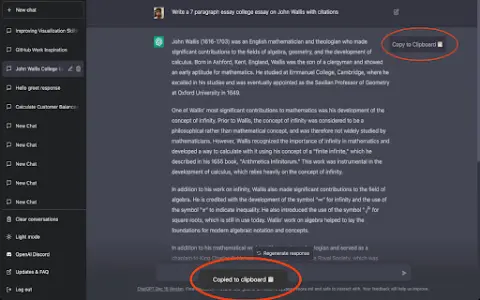
Copy for Chat GPT
An extension used to copy ChatGPT responses and check for plagiarism.
Introduction
Extension to copy ChatGPT responses and check for plagiarism.
What is the Plagiarism Detector Extension for Chrome – an extension/plug-in for Google Chrome?
This extension allows you to copy the responses generated by ChatGPT by clicking a button or using the CMD+K shortcut key, and then have those responses checked by plagiarism detection tools.
How to use the Plagiarism Detector Extension for Chrome?
You can use this extension by clicking the copy button on ChatGPT’s response or by pressing CMD+K. The copied text will be automatically checked to determine whether it contains any plagiarized content.
The core functionality of the Plagiarism Detector Extension for Chrome.
One-click to copy the response from ChatGPT
Use the CMD+K shortcut key to copy.
Automatic plagiarism detection
Related
Codebreaker AI
Codebreaker AI predicts the personality and purchasing behavior of potential customers, thereby accelerating the sales process.
RankU – YouTube Creator Tool
RankU is a YouTube growth tool that offers insights based on artificial intelligence technology and provides personalized recommendations.
ELTic – Job Change Prediction
An AI Chrome extension that helps law firms recruit personnel by predicting potential career changes among candidates.
Predict Expert AI
AI prediction APIs and the development of customized AI models for various industries.
inventoro.com
Cloud-based inventory management software that simplifies multi-channel inventory control and offers AI-powered forecasting capabilities.
Tarot GPT
An AI-based tarot card application that provides daily readings and insights on love, work, and more.