AI TOOL / #07222
ReadImage
Extract, edit, and copy text from images on web pages.
Introduction
Extracts, edits, and copies text from images on web pages.
What is Image Text Extractor ai chrome extension/plugin?
This extension allows users to extract text from images displayed on web pages. It supports common image formats such as jpg, jpeg, png and bmp. After extraction, the text can be edited and copied.
How to use Image Text Extractor ai chrome extension/plugin?
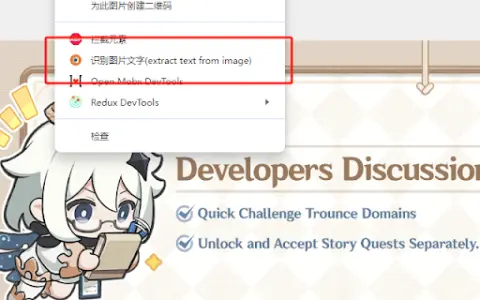
Hover your mouse over the image, right-click and select "Extract text from image". Press "Ctrl + Q" to view the extracted text on the extension page, where it can be edited and copied.
Image Text Extractor ai chrome extension/plugin core features
Extract text from images on web pages
Edit extracted text
Copy extracted text
Related
AI On It
Intelligent email assistant – identifies events and tasks contained in emails to help you stay organized.
Morgen
A time management platform that integrates calendar, task, and scheduling features, and is equipped with AI-driven planning capabilities.
Agenda Hero for Chrome
A Chrome extension that allows users to create calendar entries from text with just one click.
Text-2-ICS
Automatically create calendar events based on text descriptions – saving you time and effort.
Torq AI
Chrome extension that delivers AI-powered Gmail replies and enhanced browsing productivity.
Arvin
An all-round artificial intelligence assistant, designed for writing, content creation, and image generation.