AI TOOL / #05985
Voiceboost – ChatGPT
A Chrome extension designed for voice-controlled interaction with ChatGPT.
Introduction
Chrome extension for voice-controlled ChatGPT interaction.
What is the Voiceboost AI Chrome extension/plug-in?
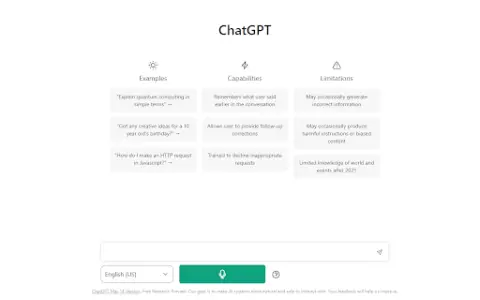
Voiceboost is a Chrome extension that allows users to interact with ChatGPT via voice commands. It adds a button below the input field; by clicking this button, the system captures the user’s verbal inquiries and sends them to ChatGPT for responses. This provides a hands-free alternative for entering text.
How to use the Voiceboost AI Chrome extension/plug-in?
Click the button added below the input area to start recording your voice input. Alternatively, use the keyboard shortcuts: Ctrl+Shift+S (Windows) or Command+Shift+S (Mac) to begin recording, and Ctrl+Shift+E (Windows) or Command+Shift+E (Mac) to stop and submit the recording. Make sure to grant microphone access when prompted.
The core functionality of the Voiceboost AI Chrome extension/plugin
Voice input for ChatGPT
Keyboard shortcuts for voice capture and submission
Related
RIZZ AI
The AI dating assistant helps to improve conversations and increase the chances of successful dates.
TalkingPdf.io – Chat with any PDF
Chat with PDFs using AI to quickly find answers and summaries.
Zappr.AI
An artificial intelligence-based chatbot platform used for document analysis and search, capable of handling natural language interactions.
HybridAI
HybridAI: AI chatbot with emotional awareness, function invocation and human takeover.
ChatGPT on Telegram
Access ChatGPT within Telegram to obtain answers and assistance quickly.
ZykaAI
An AI-driven digital adoption platform designed for SAAS websites, aimed at enhancing user experience and providing greater support.