AI TOOL / #04208
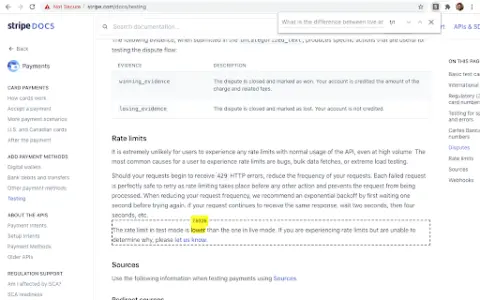
Shift-Ctrl-F: Semantic Search for the Browser
A Chrome extension that uses MobileBERT to search for and highlight answers on web pages.
Introduction
Chrome extension using MobileBERT to search and highlight answers on webpages.
What is the Shift-Ctrl-F Chrome extension/plugin?
Shift-Ctrl-F is a Chrome extension that utilizes the MobileBERT model, which has been fine-tuned using the SQuAD dataset. This extension uses TensorFlowJS to search for answers on web pages and identify relevant elements. It allows users to enter natural-language queries and find corresponding answers within the content of the current page.
How to use the Shift-Ctrl-F Chrome extension/plugin?
1) Open the extension pop-up window using the toolbar or shortcut key (Shift-Ctrl-F).
2) Enter your natural language query in the search box.
3) Press Enter and wait for the model to return the results.
The core functionality of the Shift-Ctrl-F Chrome extension/plug-in.
Conduct natural language question-and-answer interactions on web pages.
Highlight relevant elements based on the search query.
Efficient processing using MobileBERT
Related
Sell The Trend – Winning Product Dropshipping
A suite of dropshipping tools designed for product research, store automation, and order fulfillment processes.
Prodhub.ai
Product management solutions that incorporate automation, predictive capabilities, and insights help accelerate the time to market for new products.
prewave.ai
An artificial intelligence-based platform for supply chain risk monitoring and compliance management.
Smart Story Ai
An AI-powered SEO tool designed for content creators, aimed at predicting and enhancing the performance of their content.
Rude Karma
An astrological app that offers humorous interpretations of one's fortune and birth chart.
UV Weather
Advanced weather forecasting utilizing machine learning techniques.