AI TOOL / #04197
Text Selected
An extension for selecting text and retrieving relevant answers from a remote JSON file.
Introduction
Extension for selecting text and getting relevant answers from a remote JSON file.
What is the Text Selection Extension AI Chrome extension/plugin?
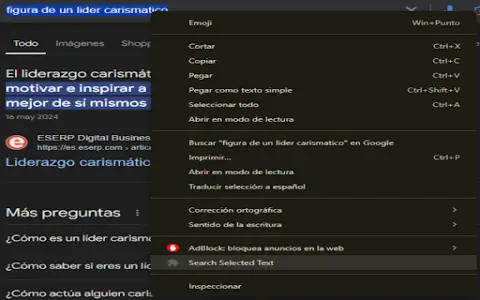
This extension allows users to select text on a webpage and quickly and efficiently get relevant answers. When you select text and use the extension’s context menu option, the selected text is sent to a remote service, which searches for the corresponding answer in a JSON file hosted on Google Cloud Storage. The answer is then displayed as an alert, providing you with additional information about the selected text. This is a useful tool for getting data and answers while browsing the web.
How do I use the Text Selection Extension AI Chrome extension/plugin?
Select text on a webpage and use the extension’s context menu option; the answer will be displayed in an alert.
Core features of the Text Selection Extension AI Chrome extension/plugin
Text selection and answer retrieval
Context menu integration
Remote JSON data source
Alert-based answer display
Related
HS Code Search
A B2B cross-border trade payment platform that offers secure and cost-effective international transactions.
Polisis
Polisis utilizes deep learning techniques to visualize its privacy policy, thereby simplifying the understanding process for users.
Chatgpt – Google Doc Analyser
Analyze Google Documents to obtain insights and summaries – no need to manually copy and paste the content into AI tools.
ClauseCatcher
AI-powered Chrome extension to simplify and understand legal documents.
BRYTER Extract | AI for Legal
A code-free platform designed to automate services through AI-driven data extraction and workflow management.
HelloSign
Dropbox Sign offers solutions for electronic signing, digital workflows, and electronic faxing.