AI TOOL / #04050
AI Roundtable
Ask a question and receive answers from multiple AI assistants.
Introduction
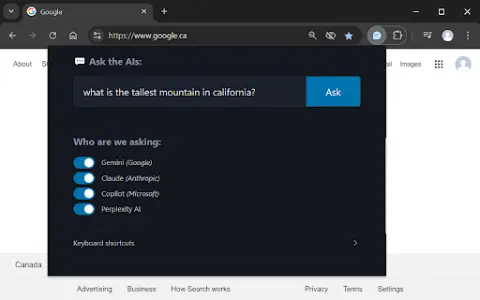
Ask one question, get answers from multiple AI assistants.
What is a Multiple AI Assistants Chrome extension/plug-in?
This website allows users to submit questions at once and receive answers from multiple AI assistants. Users can customize which assistant they want to use for their queries. The website also provides keyboard shortcuts, making it easy to access various functions quickly.
How to use the Multiple AI Assistants Chrome extension?
Use the shortcut keys Ctrl/Cmd + Shift + Q to open the query window and start typing your question. Use Alt + 1 to switch to Gemini, Alt + 2 to switch to Claude, Alt + 3 to switch to Copilot, and Alt + 4 to switch to ChatGPT.
The core functions of various AI Assistant extensions/plugins for Chrome.
Query multiple AI assistants simultaneously
It is possible to customize the selection of AI assistants.
Convenient and fast keyboard shortcuts
Related
Gamma.ai
An artificial intelligence-powered solution for protecting cloud data against loss and enhancing security awareness training.
yBully
Chrome extension for detecting and limiting cyberbullying tweets on Twitter.
Vigilocity
Vigilocity’s Mythic platform enables real-time detection and interference with those attempting to carry out threatening activities or cause significant intrusions.
fyu.se
Fyusion offers AI-based solutions for vehicle damage detection and 3D imaging.
omnilert.com
Artificial intelligence gun detection and emergency mass notification system for increased safety and response speed.
Vectra
Vectra AI: An AI-based cybersecurity platform designed for threat detection and incident response.