AI TOOL / #03930
SciGPT: Summarize a scientific paper
SciGPT uses ChatGPT to provide insights and suggestions for scientific papers.
Introduction
SciGPT uses ChatGPT to provide insights and suggestions for scientific papers.
What is SciGPT ai chrome extension/plugin?
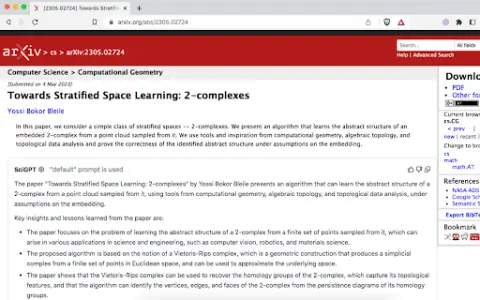
SciGPT Generate insights, suggestions, questions and references by using ChatGPT directly from abstracts as you browse scientific journal websites such as Arxiv. Currently supports 48 websites. For a complete list of supported sites, please visit our website (github). If you need support for other sites, please feel free to submit a pull request. ChatGPT Plus plan is not required. Legal Notice: SciGPT is not an official ChatGPT™ application. It is an unofficial extension, developed and maintained independently and not affiliated with OpenAI.
How to use SciGPT ai chrome extension/plugin?
Install SciGPT extension. Browse a supported scientific journal website (such as Arxiv). SciGPT automatically generates insights based on summaries.
Core features of SciGPT ai chrome extension/plugin
Generate insights, suggestions, questions and references from scientific paper abstracts.
Supports 48 scientific journal websites.
ChatGPT Plus plan is not required.
Related
adwisely.com
AI-powered advertising solutions help e-commerce businesses increase their sales and return on investment.
Shots Maker
An AI-powered instant clothing photography platform, equipped with fashion models.
AI Logo Art
Use AI tools to transform a logo into an artistic work that can be used as a promotional visual image.
Ecoms Genie AI
An artificial intelligence coaching software designed for Shopify stores – provides AI tools and services to enhance the success rate of e-commerce operations.
AI Image Translator For Ecom Image
An advertising and dropshipping platform focused on TikTok ads and product research.
MagicBrief – Save Facebook & TikTok ads
Chrome extension to save, analyze and disassemble Facebook and TikTok ads.