AI TOOL / #02217
CSV and Parquet viewer
Use Chrome extensions to view, filter, and analyze CSV and Parquet data, leveraging artificial intelligence technologies.
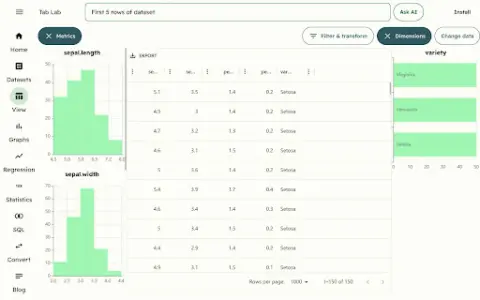
Introduction
View, filter, and analyze CSV and Parquet data with AI, using a Chrome extension.
What is the Tab Lab AI Chrome extension/plug-in?
Tab Lab enables you to view, filter, and analyze CSV and Parquet data using artificial intelligence. The Tab Lab Chrome extension allows you to open CSV and Parquet files directly from websites within Tab Lab.
How to use the Tab Lab AI Chrome extension/plug-in?
Install the Tab Lab Chrome extension. This extension allows you to open CSV and Parquet files directly from websites. Then, use the Tab Lab interface to view, filter, and analyze the data.
The core functions of the Tab Lab AI Chrome extension/plug-in
View, filter, and analyze CSV and Parquet data.
Data analysis based on artificial intelligence
Chrome plugins allow you to open files directly.
Related
AI Text Humanizer
An online tool that converts AI-generated text into human-written content, thereby preventing it from being detected by AI systems.
Rephrasy
AI-based humanized tools and detectors are designed to circumvent AI detection systems and create content that cannot be detected by such systems.
NoCaptcha Solver
Browser extensions are used to automatically resolve captchas.
Human or AI?
AI humanizer tool that makes AI text sound natural and bypass AI detectors.
Netus AI
AI-driven content creation tools used for rewriting, summarizing text, and circumventing AI detection mechanisms.
Content Credentials based on C2PA
Disclose the source and editor of the content to build trust and transparency online.