Taskade
Mind map generation tool
Introduction
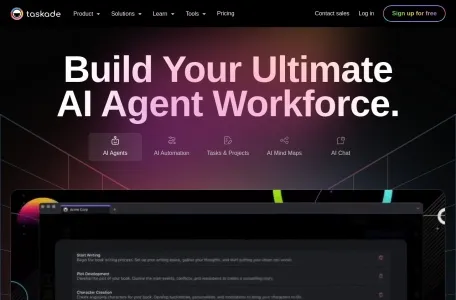
Meet your AI workforce with Taskade! Build, train, and deploy AI agents that think, learn, and act—ready to plan, research, and complete tasks alongside your team. Unlock agentic workflows where humans and AI collaborate to boost productivity 10X. Automate tasks and turn insights into action—all in one unified workspace.
Overview of Taskade
What is Taskade?
Taskade is a multifunctional online collaboration tool that integrates features such as project management, task organization, note-taking, and mind mapping. Thanks to the power of AI, Taskade not only provides a unified workspace but also enhances the user experience through intelligent automation and personalized AI assistants.
Main functions of Taskade
1. Task management and team collaboration: Users can create task lists, mind maps, meeting minutes, and team calendars, among other things. Taskade enables team members to collaborate in real time and edit projects and tasks together.
2. AI Functions: Taskade incorporates AI technologies that enable it to automatically generate corresponding tasks or mind maps. It also features a chat functionality integrated with ChatGPT. Users can utilize the AI workflow generator to create custom templates, thereby simplifying the process of creating projects and generating content.
3. Customizable Workspaces: Taskade offers customizable workspaces and project views, such as list view, card view, and calendar view. Users can tailor the layout, style, and color of tasks and projects according to their specific needs and workflows.
4. Cross-platform collaboration: Taskade is compatible with web, mobile devices, and desktop applications, ensuring that users can access and work on projects from any device.
5. Integrated Communication: Taskade comes equipped with built-in chat and video call features, enabling team members to communicate and collaborate directly within the application.
6. Extensive scalability and integration: Taskade allows for integration with popular third-party services such as HubSpot and Slack, thereby further enhancing work efficiency.
Features of Taskade
1. AI-driven: Enhance the user experience through intelligent automation and personalized AI agents.
2. Real-time collaboration: Team members can share and edit task lists, notes, and outlines in real time, thus reducing delays in information transmission.
3. Multiple view options: Supports various views such as Gantt charts and mind maps, allowing users to track project progress in different ways.
4. Cross-platform synchronization: Supports a variety of operating systems and devices, ensuring that users can access and update their tasks on any device.
5. Customization and flexibility: Users can customize the layout, style, and color of tasks and projects according to their own needs and work processes.
6. Attractive Interface: Taskade features an elegantly designed interface that provides a very pleasant user experience.
Suitable candidates for Taskade
Taskade is suitable for teams of all sizes as well as individual users. Whether it’s freelancers managing their own tasks or large teams collaborating on complex projects, Taskade can provide the necessary support. Its flexibility and intelligent features make it an invaluable tool in various fields such as the creative industry, technology development, marketing, and education.
Frequently Asked Questions about Taskade
1. How to create a task list: Users can easily create a task list in Taskade and set priorities, deadlines, and tags for each task.
2. How to achieve real-time collaboration: Team members can invite other members to join a workspace or project, and then work together to edit tasks and notes. All changes made by the members will be synchronized in real time.
3. How to use the AI feature: Users can utilize Taskade’s AI function to automatically generate tasks or mind maps. Simply select “Create with Artificial Intelligence” when creating a new project, and then enter the relevant instructions.
4. How to integrate with third-party services: Taskade supports integration with a variety of third-party services. Users can find the integration options in their settings and follow the instructions to complete the integration process.
5. How to customize the workspace: Users can tailor the layout, style, and color of their Taskade workspace according to their own preferences. Simply select the appropriate options in the settings to make the necessary adjustments.
Please note that the above information may change over time. For specific features and usage instructions, please refer to Taskade’s official documentation or help center.